“I clicked something I should not have”
Virus and malware removal in Prescott
Don't be embarrassed. These scams are professionally built, and everyone eventually clicks one. What matters now is cleaning the machine completely and making sure nothing was taken with it.
Any of this sound like your week?
- Pop-ups that will not close, or a voice telling you to call Microsoft
- A fake virus warning with a phone number is filling the screen
- A new toolbar, homepage or search engine you never chose
- You let a caller connect to your computer and now you regret it
- Friends are getting emails you did not send
- You are locked out of your own email account
- The antivirus was mysteriously turned off
- The computer is suddenly slow and covered in ads
A standard visit is $160 an hour with no trip fee and no diagnostic fee, and remote work has a 30-minute, $80 minimum. Virus removal usually takes a single session; remote sessions typically run 30 to 60 minutes. On-site, you'll have a plain-English action plan within the first 30 minutes.
A remote session typically runs 30 to 60 minutes, so a single-session removal is usually $80 to $160 all-in.

What we actually do
How this gets fixed
-
We stop the bleeding
Disconnect what needs disconnecting, end any remote-access session that's still open, and find out what the infection actually was: an adware nuisance and a stolen password get very different responses.
-
We clean it fully
A ThreatDown scan, the Malwarebytes Toolset for the stubborn remainder, a browser reset, a startup audit, and a final scan that verifies the machine is actually clean, not just quiet.
-
We check the blast radius
We find out what the infection could reach: saved browser passwords, email, banking. We reset what matters, turn on multi-factor authentication where it counts, and tell you plainly what was and wasn't touched.
Remote fixes usually happen the same day you call, often on the first call. If the machine is unusable or shouldn't go online, we come to you with no trip fee, and from November 1, 2026 you can bring it to the Tek Shop instead.
If a scam caller has you right now
Maybe a pop-up locked the screen, you called the number on it, and someone is now asking for remote access, gift cards or your bank login. Stop where you are. Hanging up costs you nothing.
- Hang up. No legitimate virus warning ever includes a phone number.
- Disconnect the computer from the internet: unplug the cable or turn off the WiFi.
- Do not log into your bank, and do not move money at anyone's instruction.
- Do not pay: not by card, not by gift card, not by wire.
- Leave the machine off or offline until it has been checked.
- Call us at (928) 583-4454 and tell us exactly what happened. We've heard it all, and we don't judge.
The three infections we actually see here
The most serious pattern: a scam caller talks someone into granting remote access, then quietly installs ScreenConnect, a legitimate remote-control tool, so they can come back later. Antivirus rarely flags it, because it isn't technically malware. We know to hunt for it, and we remove it along with whatever else came in behind it. Our guide to scams going around Prescott right now covers what these calls sound like.
Then there are the malicious pop-ups and fake virus warnings, adware and browser hijackers riding in on a bad ad or a hijacked notification. We remove the cause, then close the door it came through: an ad blocker goes on and browser notifications get turned off, because that's where these often live.
And the one that costs people the most sleep: a hacked email account, usually from a password reused on a breached site or typed into a convincing fake login page. We regain access where we can, reset passwords, turn on multi-factor authentication, and file support tickets for anything we can't reach directly. A password manager is what keeps it from happening twice.
What a removal includes
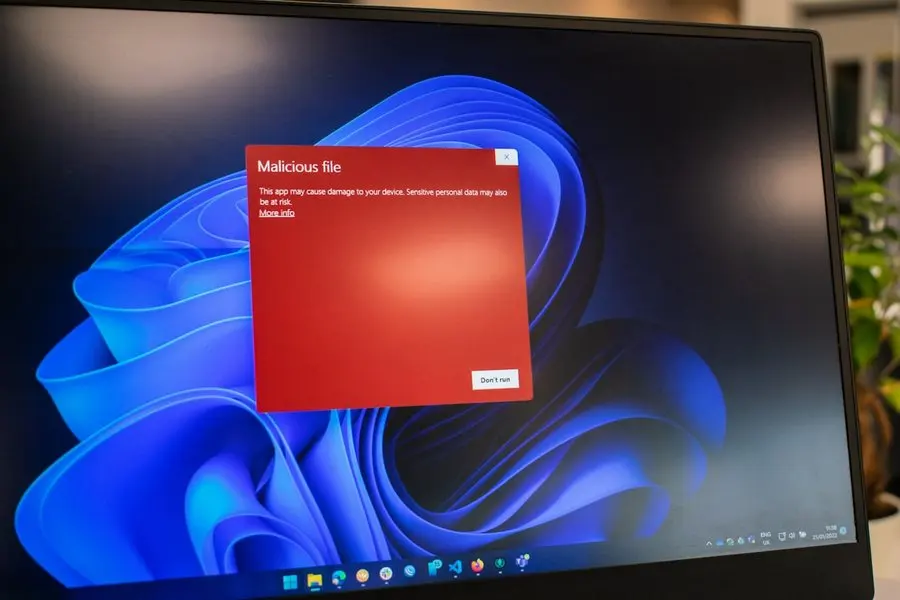
We run professional tools, ThreatDown by Malwarebytes and the Malwarebytes Toolset (MBTS), and the scan is only the start. A machine isn't done until it's verified clean and the accounts it touches are secured.
- Full malware, spyware and adware scan with ThreatDown by Malwarebytes
- Deep cleanup with the Malwarebytes Toolset for anything the standard scan leaves behind
- A hunt for remote-access tools a scam caller may have installed
- Browser reset: rogue extensions gone, notifications off, homepage and search engine back under your control
- Ad blocker installed so the pop-ups don't return next week
- Startup audit so nothing unwanted relaunches at boot
- Password resets and multi-factor authentication on any account that was exposed
- A verification scan and a plain-English rundown of what it was and what it reached
Will I lose my photos?
Almost certainly not: files and photos survive in almost all cases. Wiping a machine is genuinely uncommon, and when it is the right call it's usually because the computer was old enough to replace anyway. At that point new computer setup with everything carried across is the better spend.
Every infection scare teaches the same lesson, though: a backup that runs automatically turns the next one from a crisis into an errand.
When an infected machine should come to us
Most removals still happen remotely, the same day, while you watch your own screen. That stays the fastest route when the computer works well enough to hold a session and is safe to put online.
When it isn't safe, or a scam caller had control of it, the Tek Shop is the other answer from November 1, 2026. Full malware and ransomware cleanup is Tek Core, $240 flat, including the hunt for remote-access tools left behind and the verification scan at the end. A quick scan while you wait is Tek Counter, $40. The price follows the job rather than the clock, so an infection that fights back for two days still bills at $240.
Checked-in machines get the concierge pass on the way out: dust blown out, the outside cleaned, a scan, and written health notes. One rule doesn't change with the address. The accounts matter as much as the machine, so passwords and multi-factor authentication get sorted before anyone calls it done.
Help in the Quad Cities, and for family far away
Virus removal works well over a remote session, so a machine on acreage outside Chino Valley or Dewey-Humboldt is exactly as close as one in downtown Prescott. When a computer shouldn't go online at all, we come out: Prescott, Prescott Valley and everywhere between, same rate, no trip fee. Remote sessions run while you watch your own screen.
And a call we're used to: the computer belongs to a parent in Prescott, and the person dialing is their adult child two states away. Remote support works nationwide, so the family can hire us and sit in on the first session by phone while we work with mom or dad directly, until the machine is clean and the accounts are locked down.
My email is hacked, and I don't know what else they got
Walked back, account by account
A client called in a panic: their email had been hacked, and other accounts looked compromised through it. We didn't start with software. We walked the whole scenario through with them, piece by piece, and confirmed what had actually happened, and just as importantly, what hadn't.
Then the work: we regained access to every account we could, reset the passwords, enabled multi-factor authentication, and filed support tickets for the ones we couldn't recover directly, honest the whole way about which was which.
They ended the session with every reachable account secured and a concrete plan to prevent a repeat. The cleanup mattered, but the plan is what let them sleep.
“TekStop Was very helpful. My computer had been hacked and the attacker made some unauthorized purchases. TekStop gave me immediate instructions to shut down the attack. They came out to my place immediately, found the problem (malware) and made some other corrections. Josh, my Tech, was very helpful, kind and knowledgeable.”
Keep it from happening again

Our recommendation: OneStop Ultimate
Ultimate is the honest answer to "how do I make sure this never happens again": DNS filtering blocks the bad site before it loads, and 24/7 monitoring responds to whatever slips past.
OneStop Ultimate is $65/month.
Prefer to try it yourself first?
Free guides from our Tech Tips
Written by the same techs who'd answer your call. No strings attached.
-
 Virus Removal Tutorial – How to remove computer viruses for FREE A step-by-step tutorial for removing computer viruses with free tools, covering safe mode, scanners and browser cleanup, plus the signs it's time to call for help.
 -
 Scams Going Around Prescott Right Now The scams our clients are actually seeing this season. Fake Microsoft pop-ups, bank impersonation texts, Medicare calls, and the gift-card tell.
Common questions
How much does virus removal cost?
Remote sessions typically run 30 to 60 minutes, and virus removal usually takes a single session: $80 to $160. On-site visits are $160 an hour with no trip fee and no diagnostic fee, and we tell you what we're finding before we spend more of your time.
How long does it take?
Usually one session, the same day you call. Hacked accounts sometimes need follow-up while a provider works a support ticket, and we say so up front when that's likely.
Can you remove a virus remotely, or do you need to come out?
A remote session lets you watch your own screen while we clean the machine; if the computer is unusable or shouldn't be put online, we come to you instead. From November 1, 2026 you can also bring it to the Tek Shop, though you'll never be required to move it.
Do you work on Macs?
Yes. Most of our clients run Windows, but fake warnings and browser hijackers hit Macs too, and we remove them there as well.
Will I lose my files?
Almost never: files and photos survive in almost all cases. A full wipe is rare, and when it's warranted the machine has usually earned retirement anyway, so the conversation becomes moving your files to a new computer, not losing them.
What if it can't be fixed?
You pay the hourly rate for the time spent, never a separate diagnostic fee, and we never keep billing without telling you. If the honest answer is that the machine should be replaced, we say so early and help you do that instead.
A warning says my computer is infected and gives a number to call. Is it real?
No. Microsoft, Apple and your bank never put a phone number in a pop-up. Don't call it, and if you already did, don't let anyone connect to your machine. Call us instead.
I gave a scam caller remote access. Now what?
Disconnect the computer from the internet and leave it offline, don't log into your bank from it, and don't pay anyone anything. These callers often install a remote-access tool like ScreenConnect so they can come back. We hunt it down, remove it, then reset the passwords that matter.
I already paid the scammers. Can anything be done?
Call your bank or card company immediately and dispute the charge. They can tell you what's possible, and the sooner you call, the better. Then call us to clean the machine and lock down your accounts.
Is free antivirus enough?
Antivirus alone can't keep Windows patched, block a bad site before it loads, or respond at 2am. That's the layer OneStop adds: Plus keeps ThreatDown running year-round with Windows patching and error monitoring, and Ultimate adds DNS filtering and 24/7 monitoring and response.
My parents are in Prescott and I live out of state. Can you handle this for them?
Yes, it's a call we're used to. You can hire us and join the first session by phone; we work with your parents directly, at their pace, remotely or at their home in the Quad Cities, and report back on what we found and fixed.
We provide virus removal for homes throughout Prescott, Prescott Valley, Chino Valley and Dewey-Humboldt. We also work by phone and remote, nationwide.
In your home
Prescott, Prescott Valley, Chino Valley, Dewey-Humboldt (Arizona's Quad Cities).
By phone & remote
Remote support and OneStop Memberships reach all 50 states.
Get Connected. Stay Supported.
Ready to be done with this?
Call now. If it's remotely fixable, it can be handled today.
Call TekStop at (928) 583-4454 Monday–Friday, 8am–5pm. Closed all federal holidays and Black Friday.
After hours, you'll get an emergency option. Emergency work is billed at $320/hour.